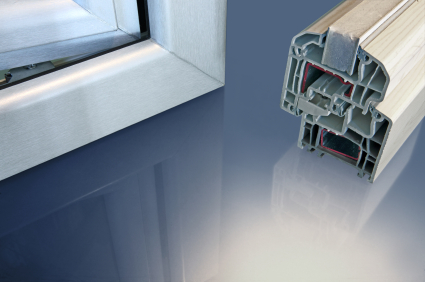
Energy Efficient Window Replacement

Friday, July 6th, 2012

Energy Efficient Window Replacement Window Replacement

While they may seem extremely expensive to install and purchase (especially if you want to replace all of your windows), an energy efficient window replacement will usually pay itself off at resale and save you hundreds of dollars annually.  However, there are a variety of types and price ranges for energy efficient windows and you need to find the best window for your climate and house.  In order to do that,  there are a couple factors that you need to consider when choosing and installing energy efficient windows.

Understanding window performance

Each window will perform less or more efficiently based on the types of glass and spacer used in the frame.  Windows usually lose heat during the cold season and gain heat during the hot season, which adds to the energy costs of each household.  The U-factor is a measure of the rate of non-solar heat flow. So the lower the U-factor, the more insulating and efficient the window.  The U-factor should be displayed prominently on all windows, so be sure to check this statistic before purchasing any energy efficient windows.

A big factor that determines window performance is the number of panes the window has.  You want a window with more panes because it decreases the U-factor, meaning there is greater insulation. Another factor is the gas filler between the panes. While air is a great insulator, argon and other gases are sometimes used as well for even greater insulation. The distance between panes also affects efficiency; a window with more distance between the panes with only air can often outperform argon-filled windows that have a smaller distance between the panes.

Looking at labels

Energy Star labels are helpful when determining which windows meet certain energy specifications, so be sure to read them completely and carefully to find out which window fits your lifestyle. While the highest-end windows are extremely energy-efficient, they usually are not worth the price for residential homes.  Consider your climate as well, as a moderate climate may require less energy efficient windows. So use your best judgment when weighing cost vs. efficiency to get the best fit for your home.

Installing the window, however, is an issue in and of itself.  If you don’t want to deal with installation, you can always use TalkLocal to find high quality window replacement services in minutes.  They’ll help you out with your specific need, based completely on your schedule.

Sound on Computer is Not Working

Friday, July 6th, 2012

Sound on Computer Not Working Computer Repair

Having a working sound system is crucial to watching movies, listening to music and just enjoying your computer so when the sound on computer is not working, it can be brutal. Without a sound system, listening to music and enjoying computer games becomes impossible.  You may also miss important business calls and instant messages without a sound notification.  Don’t let sound problems slow you down.  Here are a few notes on major causes for why the sound on your computer is not working and some advice for how to fix the problem.

Obvious Things That Are Easily Overlooked

First, check to see that there is a power supply connected to the speakers if you are using an external form of sound system. Then check to see that the speakers themselves are not faulty by trying the speakers with another electronic device such as an iPod. Also check to see if the volume controls on the speakers themselves are not turned down. Finally, check to see that the speaker system is plugged into the correct port.

Computer Does Not Recognize the Speaker System

There is a chance that the computer may not notice that it is connected to a speaker system. This problem is fixed by accessing the computer’s control panel, clicking on the sound configuration system, and choosing the correct speaker system.

If the choice for the desired speaker does not appear in the sound configuration menu, check to see that the jacks (plugs) for the speakers are not faulty by trying them on to another computer. Keep in mind that some speaker systems may be defective.

Sound Card Problems

The sound card is the internal computer device that facilitates the exchange of audio signals. It is a crucial component that is responsible for a working sound system in your computer. To ensure that the sound card works properly, connect a working pair of headphones or ear buds to the computer and test the sound by playing an audio file. If that still doesn’t work, chances are that your computer system is suffering from bad hardware.

Bad Hardware

If above recommendations do not resolve the issue and sound on computer is not working still, it is likely that the sound card or the speakers are defective. At this point it is recommended that you call for help from the local experts. TalkLocal can help with finding the correct local expert to fix your computer quickly, saving you time and energy in a stressful situation.

How to Install a New Faucet

Friday, July 6th, 2012

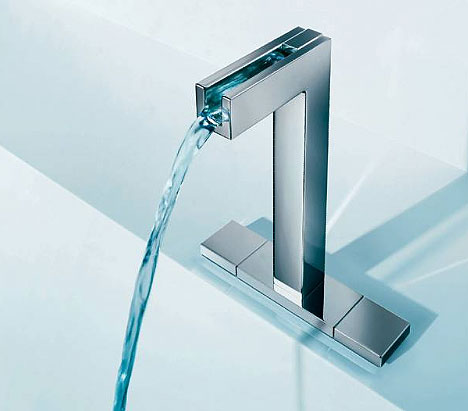
How to Install a New Faucet...Easier Than You Think Plumbers

It’s very easy to install a new faucet using only a few tools.  Below are some quick guide on how to install a new faucet:

1. Turn off the water. This valve can be found underneath your kitchen or bathroom sink. Test to make sure the water is completely off by opening the faucet.
2. Remove the old faucet head and clean the surface so it’s ready for the new one.
3. Apply a thin coat of plumber’s putty on the base of the new faucet.
4. Be sure the connected supply lines are running through the holes in the sink. Place the faucet parallel to the back of the sink, pushing it face down for a secure seal.
5. Underneath the sink, screw and tighten the nuts and washers provided with the faucet and tighten them with a basin wrench or slip-joint pliers.
6. Attach the water supply lines to the shut-off valves for the hot and cold water joints. Tighten the nuts with a wrench carefully.

Now it’s time to use the sprayer base.

1. Apply plumber’s putty around the base. If you have a marble sink, use silicone caulk instead.
2. Place the tailpiece of the sprayer base into the sink opening
3. Press the sprayer base into the sink.
4. Screw in the mounting nuts.
5. Attach the sprayer hose to the sprayer piece.
6. Place the friction washer over the hose.
7. Screw the mounting nut onto the piece.
8. Tighten the bolts and you should be done. Turn on the faucet to check for any leaks and tighten appropriately.

If you don’t have the time to install a new faucet yourself, TalkLocal can help you find a plumber that can visit at your convenience. Just fill out a service request online stating your need, location, and availability. Then, up to three local service providers will call for your business. They already know your service need and will be able to help you when you are free.

The Best Locks for Your Home

Friday, July 6th, 2012

The Best Locks for Your Home Locksmiths


What type of locks are best for your home so that it will be the most protected?  There are many different types and brands of locks on the market today, so knowing which ones to choose can be quite a task.  Here you’ll find out about basic kinds of locks and how to best guard your home.

Doorknob Lock

This is the  most basic type of lock. This is the kind that is inside a door handle and opened with a key from the outside.  While existent on many homes’ doors, a doorknob lock is actually quite easily compromised.  This type of lock is suitable for inside doors, such as bathrooms or closets, but it should always be paired with another type of lock in an indoor/outdoor passageway.

Auxiliary Lock

You most likely know this type by its use in hotel rooms (the attachable chain that only allows the door to be opened a certain amount).  An auxiliary lock can be overcome by mere human force, making it even less safe than a doorknob lock.

Deadbolt Lock

This is the most common and safest lock to install for home security.  From the outside, this is the type of lock that looks like a metal cylinder with a keyhole in the middle.  When activated, a deadbolt inserts a piece of metal into the frame next to the door, preventing entry to those without a key to turn it back.

There are a few features to be aware of when choosing an adequate deadbolt for your home.  First of all, you want the device to be steel.  This will provide the strongest resistance should someone attempt to overcome the lock by force.  Secondly, the deadbolt itself should be at least one inch long.  Anything smaller than this can too easily be worked out of the door frame without the proper use of a key.  Another part of the lock that you want to work properly is the strike plate.  This is where your deadbolt is being inserted, and damage should not be easily inflicted upon it.  Durable screws (the safest being about three inches long) are essential in keeping the strike plate at its most secure.

Even with this basic knowledge of locks in mind, you may still be overwhelmed when presented with so many brands in a hardware store or locksmith shop.  It is tempting to simply grab the most expensive one and expect it to be the best for your home’s protection.  However, remember that unless you are upgrading to a very high quality, nearly indestructible brand, most locks (if installed correctly) will give you the same level of security.

If you are unsure of the quality of your home’s locks, it is best to consult professionals.  Locksmith companies are full of experts in this field and can point you to the best types and brands of lock for your home. TalkLocal can easily connect you to these local professionals and put you well on your way to the best home security.

Natural Ways to Kill Ants in the Home

Thursday, July 5th, 2012

Natural Ways to Kill Ants in the Home Pest Control

Ants can be a huge problem in any home. These pesky insects can invade any place in your home, whether it be in the kitchen, bathroom, or bedroom.  There are a myriad of different products available for dealing with home ant infestations, the most common being poisoned bait traps and pesticide spray.  The problem with these solutions is that they often make use of harmful chemicals and poisons that you might not want to use in your home.  Leaving poison ant traps around can be dangerous for children or pets that might find them interesting, and it is never a good idea to use poison sprays in places like the kitchen that are full of food.  Have no fear though; if poison and artificial chemicals are not for you, there are also many natural ways to kill ants in the home.

Preventative Measures

One common cause of ants is messy counter tops or kitchen floors.  Ants are attracted by the smells of food so it is important not to leave food lying out and to clean up any messes.  Wiping surfaces down with a little bit of vinegar helps to keep ants away because they do not like the smell and it interferes with their ability to navigate.  Doing this regularly is a great way to maintain an ant-free kitchen.  There are many other smells that ants find repulsive, including bay leaves, cloves, cayenne pepper, and garlic.  You can try placing these natural repellents at the entry points where ants are getting into your home or in closets and cupboards you want to keep ant-free.  Talcum powder can also work as a natural ant repellent.

Natural Ant Traps

If you want something that will actually kill ants rather than just keep them away, you can make your own natural, poison-free ant traps with just a few simple ingredients.  All you need to do is mix borax powder, which is available in the laundry detergent aisle, and some ordinary jelly together in a small shallow container that ants will be able to get into, such as a soda bottle cap. They are small and easy to place unobtrusively around your house.  Once you have thoroughly mixed the borax and jelly and filled your containers, leave your homemade ant traps out wherever the ants appear.  Ants will be attracted to the jelly, but the borax will cause problems in their digestive system that will eventually kill them.

If you have tried all this and are still having ant problems, then it might be time to get in contact with a professional exterminator.  There are many exterminators who specialize in pesticide-free pest removal; you can use TalkLocal to find a local professional who can cater to your needs.  Simply enter your location, availability, and a description of your problem and TalkLocal will connect you in minutes to someone who can help.

Computer Wont Turn on After Power Outage

Thursday, July 5th, 2012

Computer Wont Turn on After Power Outage Computer Repair

Recent power outage did more damage than you thought.  Your computer wont turn on after power outage and you have no idea what to do. The damage is usually done to the file system while the computer is in operation. Typical operations include, but are not limited to: downloading a file, playing a game, and making PowerPoint slides. A sudden loss of power interrupts the operation, possibly corrupting the file system that was being used.

Depending on the file system that was being used, consequences of a power outage may differ. Sometimes a game system or a document that was being used may simply become inaccessible due to file corruption. Sometimes the necessary components for the computer system itself may become damaged, resulting in a dead computer.

How to Prevent the Damage

Use of a UPS (Uninterruptible Power Supply) is advised if working under a prediction of a power outage. UPS is a battery device that usually only supplies power long enough for you to safely shut down the computer, preserving the files being used during the power outage. Typical UPS batteries cost around $100, and are expected to last for somewhere between 4 to 6 years.

UPS units also provide surge protection up to and around 6,000 volts. UPS works to counteract any power spikes or dips in the power supply, helping the computer last longer with limited power.

How to Fix Your Computer

Further complications to the computer system following a power outage may vary greatly with each case and a direct help from the local experts is recommended. TalkLocal can help with finding the correct local expert to fix your computer quickly, which saves you time and energy in a stressful situation.

Unclogging a Drain Without a Plunger

Thursday, July 5th, 2012

Unclogging a Drain Without a Plunger Plumbers

Nobody enjoys a clogged toilet, sink, or bathtub. It’s especially problematic when you don’t have the right tools to fix it. Fortunately, unclogging a drain without a plunger is possible.

A clogged pipe can be cleared using common household items such as salt and hot water. Pour some salt down the drain, then follow up with a continuous flow of boiling water. It should dislodge anything that has caused the drain stop working. If you have a bendable clothing hangar lying around, it can be very useful to scoop up hair or debris that is interfering.

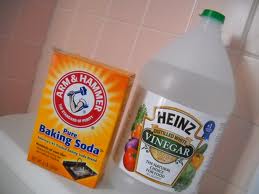
Another option is to use a mixture of baking soda and vinegar. Pour some baking soda down your drain, then slowly pour in vinegar. The chemical reaction is sometimes enough to dislodge the culprit of the clog. Be sure to flush the drain with hot water afterwards.

Don’t trust at-home remedies? Run to your local convenience store or supermarket and pick up some de-clogging drain cleaner. Any brand should work, but remember to follow directions carefully. Needless to say, it should not be ingested or inhaled. The chemicals in drain cleaner are very dangerous if they come into contact with your skin, so use gloves and handle carefully.

If none of the above items work, it’s time to call in a professional plumber. TalkLocal can connect you with a plumber to get you help immediately. The process is simple. Just fill out a service request with your need, availability, and location. TalkLocal notifies local high rated businesses about your problem. Then, you will receive up to three calls from plumbers who can help you–on your schedule. Say goodbye to waiting around for help. TalkLocal makes appointment scheduling quick and easy.

When to Replace Roof Shingles

Thursday, July 5th, 2012

When to Replace Roof Shingles Roofers

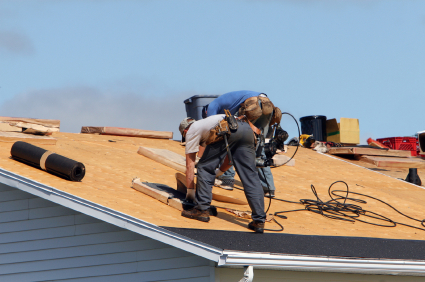
There are a few signs that can tell you when to replace roof shingles. For one, if there have been strong storms with high winds, it’s possible that the bad weather has damaged your roof shingles. You may see some shingles lying in your yard, or you may even start having leaks when it rains. Along with these obvious red flags, here are some more signs that it’s time to replace your shingles:

— You notice missing, broken, or cracking shingles in various spots on your roof

— When cleaning out your gutters, you notice buildup of granular materials (deteriorating from your shingles)

— You also notice damage or deterioration in some areas of your roof, possibly where there are dips or valley areas in your roof’s design

— Time may also be a clear factor. Usually, roofing should last about 10-12 years before it’s time for a renovation.

Is it finally time to replace those roof shingles? To get started, contact TalkLocal, a service that can connect you in 90 seconds with local construction companies who can assist you with your roofing needs. TalkLocal is a free service, and all you need to do is enter a description of your problem, your location, and your availability on the TalkLocal website. Shortly after you submit the service request, you will be on the phone with someone who can help.

My Laptop is Really Hot

Thursday, July 5th, 2012

My Laptop is Really Hot Computer Repair

When working at home on your laptop, you often might be thinking, “Wow, my laptop is really hot!”  Overheating laptops can be a serious problem for a variety of different reasons.  If your computer gets too hot, it could crash.  However, an overheated laptop can have more serious impacts than just on computer performance.  Overheated laptops have caused house fires, burned users, and studies have even linked hot laptops to male fertility problems. Yikes! Here are some tips that explain why your laptop is really hot and how to keep it cooler:

Check your fans

Because laptops are designed to be compact, all of their internal parts are more tightly packed giving them a tendency to overheat. It is important to make sure the fans are running properly for this reason. You can do this by downloading diagnostic software from the website of your laptop manufacturer, or from another reliable online vendor.

Clean out your vents

Laptop vents are narrow, so it is already difficult for the heat they generate to escape.  This problem can worsen when the vents get clogged with dirt and dust. You can fix this problem by blasting them with compressed air, which you can purchase at office supply stores. You can also try cleaning the vents using a lightly damp cloth, never a wet one.

Check your BIOS settings

Software settings inform your computer when it is too hot and trigger the fans to start working.  Computer manufacturers sometimes release BIOS updates with revised temperature settings that can help optimize cooling.  Check your laptop manufacturer’s website for information on BIOS updates, but proceed with caution because BIOS software is more complex than basic computer settings.  It may be safer to consult an expert for help with BIOS updates.

If you try these ideas and your laptop is still hot, or if you need further laptop assistance, visit TalkLocal, which will find you local computer repair professionals and have them call you back within minutes.

Is Free Software Safe

Wednesday, July 4th, 2012

Is Free Software Safe Computer Repair

There’s lots of great free software out there but is free software safe to download?  Free software can help  you with everything from doing taxes to malware removal.  But you should be careful every time you download something new on to your computer.  Free software can be great, but some free software can cause your computer serious problems.  Some hackers like to cloak their viruses in free software, and sometimes even well intentioned developers of free software can cause you problems if they didn’t work all the bugs out of their software.

When it comes to free software, do your best to stick with reputable software download sites.  Man of the House recommends Cnet’s Download.com, Tucows.com, or ZD Net Downloads.  Also, most reliable software sites provide user reviews. If the website you’re considering downloading from doesn’t provide user feedback or shows mostly negative user feedback, then it’s best to steer clear.  And just generally speaking, it’s a good idea to err on the side of caution.  If the site looks sketchy in any way, it’s a good idea not download from it.  Also, make sure that you have malware protection up and running before you download anything.

Sometimes, despite caution and research, you can still end up downloading something that causes problems on your system.  If that’s the case, you should first uninstall the software and reboot your computer.  If you really want to use the problematic software, try reinstalling it, assuming you have antivirus software up and running.

Sometimes antivirus software can mess with the process of installing new applications. You can scan the free software with your antivirus program before you download it.  This allows you to disable the real time scan option while downloading the software.    If, once you’ve done all this, you still have problems with the software, its best to uninstall the program completely and look for a different application.

Sometimes, problematic programs may refuse to uninstall.   In this case, Windows users can use Windows’ System Restore.  This will reset all your programs—without affecting your data—to a specific date.  To use the Window’s System Restore, go to Search System Restore at Microsoft.com and follow the directions for your type of Windows.   If you don’t have Windows, try to manually remove it from your installation directory.  You’ll also want to clean up your registry, because most applications install information there, as well.  For this you can use a free (but certified as reputable) registry cleaner.

If you have any question about which software is reputable, or have any issues dealing with buggy software you’ve already installed you can also use TalkLocal to find reliable local computer help.