Archive for the ‘services’ Category


Gateway Touchpad Replacement

Tuesday, January 22nd, 2013

Gateway Touchpad Replacement - Computer Repair

Since Gateway touchpads are delicate items, misuse of the touchpad or even just normal wear and tear can cause the touchpad to malfunction. For some people, it may be easier just to replace the Gateway touchpad rather than the whole computer. Warning: The process of replacing the touchpad is somewhat complicated, and you should be very careful in handling laptop parts. If you feel uncomfortable at any point during your Gateway touchpad replacement, TalkLocal can connect you to a trained IT professional to help you with this task.

Disassembling Your Laptop:

  1. Power off the laptop and disconnect any peripherals and adapters connected to the computer
  2. Touch a bare metal surface to discharge any excess static electricity.
  3. Slide out the battery and remove the two screws securing the bezel in the back of the laptop.
  4. Completely remove the bezel and disconnect the cable connecting the keyboard to the motherboard.

At this point, you need to remove the LCD display by disconnecting the four screws beneath the display and then remove four more screws near the center of the top cover. This will allow you to disconnect the blue and white cable connecting the touchpad to the motherboard. You now should be able to pull the top cover off the motherboard and replace it with your new touchpad. Ensure that you reassemble the laptop in the same way it was disassembled.

Once again, if you feel the least bit uncomfortable disassembling and reassembling your laptop, visit TalkLocal right now to find you a local computer repair professional to assist you within minutes. We will connect you with up to three local professionals who will be able to help you.


System CMOS Checksum Error

Tuesday, January 22nd, 2013

System CMOS Checksum Error - Computer Repair

There are many errors you can get while starting up a computer.  One of the more common errors you might encounter is the infamous System CMOS checksum error.  However, while this error might be extremely frustrating, there are fortunately only a couple of problems that can cause this error, all of which are easily solved.

What does this error mean?

A checksum is a value stored in the CMOS memory in order to guard your computer’s BIOS software. Every time you boot up your computer, the current value is checked against the stored value to detect whether or not the BIOS was changed. If these two values are the same, the computer boots normally. However, when these two values differ, the system flags it as a CMOS Checksum error.

What can cause this error?

There are usually 3 main reasons for the System CMOS checksum bad error:

  • A user or a virus updated the BIOS.
  • The CMOS battery may not be functioning or has expired.
  • In Windows computers, the main power supply was shut down before the operating system was shut off.

How can I fix this error?

If a user or virus updated the BIOS:

At boot, go into the BIOS screen by pressing del or F2 or the specific key combination designated by the motherboard (it should be displayed on the boot screen). Reset the BIOS settings back to default while checking that the date and time are correct. Afterwards, make sure to run a virus scan to ensure that a virus didn’t cause the error and the BIOS settings are still correct.

If the CMOS battery expired or isn’t functioning:

If you suspect this is the error, the battery can be easily changed. Before actually making any hardware changes, reboot the computer to ensure that the error still exists. Make sure to write down all the CMOS settings (if you lose them, you can obtain them from your computer manufacturer). Using the motherboard’s tech manual, locate the battery and remove it. Afterwards, replace it with a new battery with the same specifications (voltage and size) and reenter the CMOS settings.

If the computer was not shut down properly:

Make sure the computer shuts down completely before turning off the main power by going to the Start Menu and clicking Shut Down.

At any point, if you ever feel uncomfortable working with your computer or would rather have a trained IT professional do the repairs, you can always use TalkLocal to find a computer technician right now! We’ll connect you with up to three technicians in your area who can help you when you need it.

List of Tax Deductible Expenses

Tuesday, January 22nd, 2013

List of Tax Deductible Expenses - Accountants

The list of common tax deductible expenses discussed below should help you as you face the income tax hurdle this year.  As figuring out your taxes gets harder and harder, we all need more go-to information to cut our tax bills. Recognizing tax deductible expenses is essential as we gather information to reduce the amount we pay in taxes.  Here are some areas that may give you ideas for tax deductions.

Health and Family Expenses

Education expense deductions can be significant if you have a family with a number of children. Make sure to include any interest on student loans along with the typical expenses such as travel, books and supplies, and other college related expenses. In addition, families can receive tax deductions on items such as childcare costs, child tax credits and costs relating to adoption. Also, if your medical/dental expenses are greater than 7.5% of your gross AGI, you can include them in tax deductions.

Losses from Investments

Log on to your account online and print off the 1099-B form. This will give you the breakdown of any losses from stocks, mutual funds, and any other investments you may be involved with.

Real Estate

If you are a first-time homeowner – congratulations! Use the 5405 form to get a big tax break. If you have been a homeowner for a while, get the amount of property taxes you paid during the year from your escrow company. With so many people updating their energy usage at home, you can also take advantage of the home energy improvement tokens.

Retirement

Contributions to your SEP, IRA, and traditional retirement investments are tax deductible. Check out your payroll and W2 to see if some of your retirement investments are already being factored in.

Personal Property and Vehicles

If you have already paid off taxes for personal property or have spent money on registration fees for your vehicle, these expenses can sometimes be applied for tax deductions, depending on the state where you live.

More Help

There are income tax computer programs on the market that can help you double-check your list of tax deductible expenses by pinpointing tax deductions as you answer a series of questions.

Additional Help

If you would like help with anything tax-related or would like to make sure you are preparing your taxes correctly, check out TalkLocal. You will be connected directly to professional accountants right in your area who can help you at a time that is most convenient for your schedule.

How to Turn Trash into Treasure… or at least How to Re-use Your Clutter in Creative Ways

Monday, January 21st, 2013

How to Turn Trash into Treasure - Garbage Removal

How to Turn Trash into Treasure

We all have a lot of stuff- that’s just a reality of modern life.  Cleaning it out can be tough, it takes time and energy, and we often connect things with memories.  So we can end up holding on to a lot of crap for sentimental reasons… and also because we’re lazy.  But whether you have tons of old clothes, coffee cans, or even tires lying around, you should check out these ways to put your clutter to good use, and turn trash into treasure!

Old Clothes

Whether you’ve outgrown them, they’ve gone out of style, or been damaged somehow, everyone has old sweaters and t-shirts lying around.  If you’ve got old sweaters, you could turn them into something useful and fun, like purses, scarves, mittens, even pendants and necklaces.  If you need ideas for what to do, or want directions for a particular project, Resweater always has great ideas and will explain the steps for each project.

If you’ve got a lot of old t-shirts lying around, you could make them into a quilt, this can make a great gift for a kid that’s growing up and going away.  For step by step directions for this project, check out the instructions here.

Glass Bottles

If you’ve got glass bottles lying around you can, of course, recycle them the ​traditional way.  But it’s actually more environmentally friendly to re-use them without sending them to the recycling plant.  Cool old bottles can be used to give a house a vintage look, for example, you can make interesting vases out of old bottles, or use old bottles to make center pieces if you fill them with pretty pebbles.

Coffee Cans

Coffee cans are also often recyclable, but you can use them to make fun small trash cans.  Makes sure you clean the coffee can out well, then you can cover the coffee cans with funky wrapping paper or tissue paper, or even with cloth from an old t-shirt.

Tires

I don’t really understand this one, but apparently some people have a lot of old tires lying around.  If this is you, you might consider using those tires for gardening.

Additional Help

But some clutter really cannot be reused.  Often the easiest and most environmentally friendly way of getting rid of it is by hiring a junk removal place.  (You should always ask about what environmentally friendly precautions junk removal places take before hiring them.)  To hire a junk removal place, simply use TalkLocal.  It’s a great website that allows you to quickly find good junk removal places near you.

Macbook Microphone Echo

Monday, January 21st, 2013

Macbook Microphone Echo - Computer Repair

When you’re Skyping or video chatting with someone it’s extremely frustrating when you constantly hear your own voice echoing back through.  All you wanted to do was talk with your friend/family/significant other but all you can hear now is your own voice.  How can you fix your Macbook microphone echo?

The Problem

The echo you are hearing can be a result of a couple of different things.  First of all, it could be because of a delay in delivering what you said to the person on the other end.  The feedback is a natural result of this delay.  It could also be a result of them having their speakers set too loud so that their microphone is picking up what you are relaying.

How to fix this issue

The number one way to fix the feedback issue you are having is to keep your speaker’s volume low and try to use headphones so that what is being relayed doesn’t get sent back through to the other end.  Try to reduce any echoing by adjusting the way you are sitting or the angle of the computer in relation to the speakers.  This echo could also be the result of a faulty application. Try using a different app for chatting such as skype, oovoo, ichat, or facetime.

You can also go into system preferences on both ends to try and resolve the issue.  From there click on sound, then input.  Highlight the microphone and slide it to the left on the input slider.  This will reduce the amount of input the microphone will relay so it will focus less on the background noises such as the echo and try to only send what you are saying through.

Additional Help

If the echoing problem continues throughout this process it may be a more serious issue with the computer, speakers, or microphone.  You should try to talk to a professional so that you can get the best help possible.  The easiest, fastest way to get in contact with reliable local IT service businesses is to use TalkLocal. Just put in your problem and availability and let them do all the work.  Within minutes you will be connected to a professional who will be able to help you out.

Windshield Repair Scams

Monday, January 21st, 2013

Windshield Repair Scams - Auto Glass Repair

Windshield repair scams are very common- more common than many people think.  Most people don’t know very much about the auto glass repair industry so they trust the information their given by “experts.”  While most auto glass repair shops and repairmen are very honest, there are some bad apples out there who try to take advantage of their position.  Often, these swindlers target people who don’t understand what’s going on—like the elderly, people with a limited grasp of English, and teenagers.  So it’s important to stay informed about common windshield repair scams and take steps to avoid them.

Common Windshield Repair Scams

A common scam involves a person who approaches an unsuspecting person and telling him or her that they are in grave danger because of structural damage to their windshield.  He’ll make up laws or facts about windshields, and generally do anything it takes to get people to stop. In some cases there’s nothing actually wrong with the windshield; in other cases the windshield may have some damage, but not to the extent claimed. There have even been cases where the scam artist has broken the windshield himself, just to get the opportunity to repair it!  The scammer tells you he will look at it or fix it for free, but then asks for your insurance anyway in order to file a claim to fix the windshield without telling you.

To avoid this scam it’s important to remember that someone you meet in a parking lot does not constitute a repair shop.  And if it’s free, you should not need your insurance information.

Another type of windshield repair scam takes place at body shops.  Consumers come in with a chip or small crack in their windshield and the shop will tell them they need to have their windshield replaced.  It’s important to know that most small cracks and chips can be repaired, and repaired fairly cheaply, sometimes with a kit from an auto parts store. It’s in the financial interest of the dishonest repair shop to get you to pay for a new windshield when you don’t need one.

To avoid this scam, simply put off the repair until you have had a chance to check it out on your own. Be an informed consumer.  Make sure the repair place you’re going to is legitimate and do some research about the type of damage you see before having it repaired.

Additional Help

If you want to find a legitimate and highly recommended auto glass repair place near you, or if you have any questions about auto glass repairs, just use TalkLocal. We’ll connect you with up to three local professionals you can count on to get the job done when you need it.

Belkin Wireless Router Setup

Monday, January 21st, 2013

Belkin Wireless Router Setup - Computer Repair

Have you just bought a new wireless router? Use these tips for an easy Belkin wireless router setup using the Belkin start-up disk.

 1)     Plug the network cable into the Ethernet port of the router and into the data port of the modem.

2)     Place the security card on the bottom of the router.

3)     Plug the router into an outlet. A blinking blue light will appear on the top of the router. Once the light stops flashing, you may continue.

4)     Insert Belkin’s startup disk into your computer and follow the instructions.

If you do not have the Belkin installation disk, follow these steps:

1)     Make sure you have an Ethernet connection.

2)     You will be prompted for a password. New routers do not have passwords by default, so click “Submit.” If there was a password already in place, then you will need to reset the Belkin router.

3)     On the left side of the page, click on “Connection Type.”

    1. Cable Broadband users (Comcast, Cox Cable, Charter Cable, Time Warner, Road Runner): Dynamic > Next > leave “Host Name” blank > Next > Change WAN MAC Address > Clone > Apply Changes.
    2. DSL Connection (AT&T, Bell-south, AOL, Verizon Direct): click on PPPoE > Next > enter username and password given by the internet service provider > save > Home
    3. Static Connection (Qwest.net, Sky-way, Star-band, DIRECTV): click on “Static” > Next > enter the IP Address, Sub-net Mask, and ISP Gateway Address > Apply changes > enter the Primary DNS and Secondary DNS information > Apply Changes

Additional Help

If you need further assistance, contact TalkLocal to help connect you with the best local professional suited to your needs. Learn more about TalkLocal today!

How to Replace a Car Air Filter

Monday, January 21st, 2013

How to Replace a Car Filter - Auto Repairf

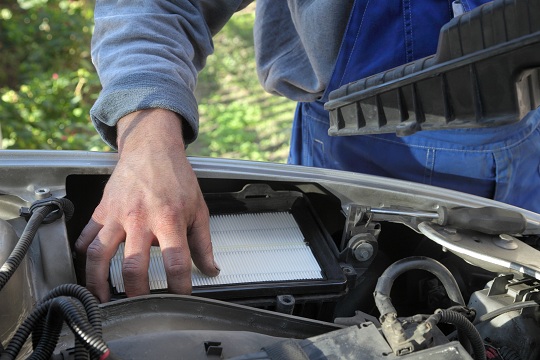
A car filter cleans the air in your vehicle with fibrous materials that remove all of the particles in the air, including dust, mold, bacteria, pollen, and other substances. All cars have air filters that protect their engine. Some cars have air filters that protect the air in the cabin of the car. Regardless of the type of air filter, the filter must be clean to do its job. A dirty air filter will affect the performance of your engine and, if you have a cabin air filter, will affect your health. This article discusses how to replace a car air filter that protects the engine.

When to Replace a Car Ai rFilter

The air filter should be replaced, on average, every six to eight months. However, if you drive in abnormal conditions (for example, in the desert), you may need to replace it more often. Many people replace the filter every two to three oil changes.

If you are looking to replace your car’s air filter, the first thing you will need to do is find a replacement filter of the same size and type as that which came with the car.

How to Replace a Car Air Filter:

  • Make sure that the car is on level ground.
  • Apply the parking brake and shift into first gear if you have a manual or keep the vehicle in park if you have an automatic.  Turn the car off.
  • Open the hood and secure it so it doesn’t fall on your head.
  • Consult your owner’s manual for the location of the filter. It is usually located right on top of the engine. Once you find it, remove the cover. You may have to undo clamps, screws, or nuts holding it in place. Place small parts such as these in a dish so they won’t roll away under the car.
  • Take out the old air filter and throw it away.  Place the new filter in exactly the same place as the old filer with the rubber rim facing upward. Replace the cover and reattach all the clamps and screws.  Your new air filter should be good to go!

Additional Help

If you have more questions about your car’s air filter or feel uneasy about doing the work yourself, use TalkLocal to find a professional near you. Let TalkLocal know what your problem is, when you are available, and within minutes you will be connected to someone in your area who will know how to replace a car air filter.

How to Recover Data After a System Restore

Sunday, January 20th, 2013

How to Recover Data After a System Restore - Computer Repair

Have you lost years’ worth of important data after a system restore on your Windows computer brought it back to the state it was in when you first bought it? First of all, in the future remember to always back up all of your data, especially before doing a system restore. However, if you haven’t backed up your data, this article will help you to recover data after a system restore.

Things You Can Try to Recover Your Data

The first thing to try is click Start and in the Search box do a search for windows.old. If you find a folder called windows.old (it should be in the C drive), then breathe a sigh of relief, all of your data from before your system restore should be in this folder.

If you don’t have the windows.old folder, all hope is not lost. You may still be able to recover some of your data, but you have to stop using your computer (turn it off): every time you do something you are overwriting any data that might still be left over from before your system restore.

Another option for recovering the data is to purchase a data recovery program. If possible, use another computer to search for and research programs, so you do not overwrite data on the computer on which you are trying to recover data. Once you have decided on a program you can download it on that computer.

Additional Help

Another option is to hire a computer professional in your area to recover your data for you. You can use TalkLocal and receive a call within minutes from someone in your area who knows how to recover data after a system restore and is available whenever you want them.

Child Custody Legal Advice

Sunday, January 20th, 2013

Child Custody Legal Advice - Lawyers - Family

Whenever there is a divorce involving a child, especially in the case of messy relationships existing between the parents, there will be a need to seek child custody legal advice.   Child custody almost always raises emotions and creates a lot of stress, not only for the parents but also for the child as well. Many divorcing parents prefer to resolve their child custody issues out of court, but sometimes a legal mandate is needed to determine who the child will live with.

Questions to Consider

The number one thing to remember in a child custody battle is that the focus should be on the best interests of the child. For example, is it good for the child to live on and off with each parent?  Should the child have one main home and visitation with the other parent?  What does the child want?  Whatever the parents agree on is taken into consideration in court because it is usually assumed that they know their family situation better than the court.

Parents will also have to decide other issues, such as which parent will be considered the primary caretaker or “custodial parent.” They must look at who will shoulder which responsibilities for the child as well as who is more able to financially provide for the child. Making these decisions can be a long and difficult process but it is one that is necessary in order to ensure the best care for the child. If parents cannot make these decisions, they have two other options: mediation or the judgment of the court.

Using a Mediator

The courts may appoint a mediator who will attempt to facilitate the parents’ negotiations. Both the parents and child go to sessions with the mediator.  A mediator is an impartial partner in the divorce process, one who takes neither parent’s “side” as their attorney is bound to do, but rather a person whose goal is to bring both parties together for a mutually satisfactory outcome. Courts often appoint mediators because it’s hard to understand a family dynamic in short court sessions.

If mediation fails, then the family will need to take the matter to court. In that case, parents will rely on the child custody legal advice given by their respective attorneys. In court, each parent will present their case for child custody and a judge will determine what is best for the child. Each parent’s attorney will be allowed to present evidence in an attempt to sway the decision in his or her client’s favor.

Additional Help

If you have more questions about child custody legal advice you should try to talk to a professional so that you can get the best help possible. The easiest, fastest way to get in contact with reliable local law firms is to use TalkLocal. Just put in your problem and availability and let them do all the work. Within minutes you will be connected to someone who should be able to assist you.