
How to Find a Snow Removal Service

Monday, July 23rd, 2012

How to Find a Snow Removal Service Snow Removal

There are several different routes you can take when trying to figure out how to find a snow removal service. Unfortunately, it is difficult to search and ultimately find a service near you. It is inconvenient to call multiple snow removal services (once you find them) just to find out that the big storm that just hit town made all of the company’s lines go busy.

If you live in a big city that has to accommodate snow each year, you may notice how a few feet of snow are cleared very quickly from the streets. At the same time, you may see on the news that another state received a few inches and had to close school. Whether you are in the big snow city or in the fair weather city, you need to be ahead of the game and get your snow cleared so you can go about your day with ease.

Snowfall facts

– New York, Alaska, Michigan, and California are the states with the most average snowfall per year.

– Washington D.C. alone gets an average of almost 15 feet per year.

– Chicago averages about 38 inches of snow each year.

– Surprising to some, Arizona clocks very high on the list due to snow coming from the mountains.

 Snow removal options

Whether you are a business owner, homeowner or kind neighbor, these are some great options to clearing snow out of the way.

1.   Call TalkLocal. This free service will connect you to a snow removal company in your area within minutes. Simply enter a brief description of your service needs along with your location and availability, and Sl will connect you to multiple businesses willing to help within minutes.

2.   Check out this do it yourself snow removal service. This method is much quicker and less taxing than the typical shovel.

Essentials for Moving into a New House

Monday, July 23rd, 2012

Essentials for Moving into a New House Moving and Storage

Moving into a new place can be a stressful experience, especially when everyday essentials are not available within arm’s reach. Before moving, consult this checklist for essentials for moving into a new house – and make sure they are easily accessible after the move.

Food & Drink

– Water – Often times, water is not drinkable when you first move in. Bring water bottles or use a Brita filter so that you can easily filter the water.

– Dried snacks – These don’t require refrigeration and can be enjoyed on the go.

– Food basics – Bread, peanut butter, apples, nuts, crackers, granola, yogurt, milk, etc.

– Cups

– Sippy cups/bottles – For kids and babies

– Paper plates and bowls – It’s nice not having to worry about breaking or washing dishes after a big move.

– Utensils

– Napkins

Everyday Necessities

– Make sure to pack your flashlights, keys, and cell phones in a box that is kept close to you. The last thing you need is to dig toward the back of the moving truck to get these necessities.

– Flashlights

– Keys

– Cell phones

– Light bulbs

– Toilet paper

Cleaning Supplies

– Cleaning may not be the most fun thing to do in your new house, but tidying up before the furniture is is – unpacked will be much easier.

– Paper towels

– All-purpose cleaner

– Glass cleaner

– Floor cleaner

– Bucket

– Sponges

– Broom

– Dustpan

– Basic towels

Nighttime necessities

– Bedding – Pillows, blankets, a mattress, etc. If the bed is not available, make sure to bring a sleeping bag for the first night.

– Curtains – So you don’t wake up at the crack of dawn

– Pajamas

– Favorite toys and books for the kids

– Night lights for the kids (if needed)

– One hand towel per bathroom

– One bath towel per person

– Basic toiletries – toothbrushes, toothpaste, soap, shampoo, etc.

If you need help finding a moving service, TalkLocal can connect you with a reliable moving service in your area in minutes.

What To Do When Your Roof Is Leaking

Monday, July 23rd, 2012

What To Do When Your Roof Is Leaking Roofers

Leaks can cause major damage to your house, which can be costly to repair. You can minimize the risk of roof leaks through regular roof maintenance. Before spending money on roof repairs, check if your insurance covers roof leakage. Keep reading to find out what to do when your roof is leaking.

Minimize Water Damage In Your Home

Place buckets or some kind of receptacle underneath the leak to prevent everything from getting wet; cover your belongings, such as photos and furniture, with a plastic tarp or some sort of waterproof cover. You should consider removing certain items to a dry location in your home. If water is splashing into the container, attach one end of a chain of paperclips to the source of the leak, allowing the other end to hang freely. Make the chain long enough to be a foot away from the container. The water will now dribble down the chain instead of splashing into the container. Along with water drips, Be sure to take care of stains and mold as soon as possible.

Shingles

Over time, your asphalt or wooden shingles may rot or be dislodged due to inclement weather. Naturally, your roof will need to be re-shingled, a job you can do yourself. Simply remove the old ones by prying them back with a pry bar and pulling the nails. Replace the damaged area with new shingles, working from the bottom up. You might need to slice off a portion of the shingles to ensure they fit securely. Do not cut off too much, as this will bring you back to your original leak problem. You can nail the shingles or anchor each shingle with roofing tar from a caulking gun.

The water damage is also more likely to occur in roof valleys, which is the area where the roof angles meet and water flow is concentrated. Roof tar is the best way to stop your roof from leaking. Get the tar or caulking underneath the shingles to ensure a secure grip that will stop water from leaking into your home.

Metal Roof

Metal roofs expand and contract with heat, which loosens metal roofing nails and expands the nail holes, thus allowing water to enter. Repair a metal roof leak by removing the nails carefully and fill the old hole with tar. Then, screw the nail back in a few inches away from the tar-filled hole.

If the leaking roof persists, TalkLocal can connect you with the best local roofers at your convenience.

How to Fix a Dishwasher that is not Draining

Monday, July 23rd, 2012

How to Fix a Dishwasher that is not Draining Appliances Repair

You have all these dirty dishes that need to get washed but the dishwasher isn’t working properly because the water is not draining.  Here is steps on how to fix a dishwasher that is not draining.

First, if your dishwasher is connected to your garbage disposal, it is possible that a clog of food or debris is causing both your garbage disposal and dishwasher drain to run less efficiently. If you turn on your disposal and hear that it is not running like it should, try cleaning it out (make sure to turn OFF the disposal before reaching in).

If this doesn’t help, you should try checking for clogs in the dishwasher drain. This can be located under your sink, in the pipe connecting from your sink to your dishwasher. Try cleaning it out by reaching down the drain and pulling out any food or debris (you may want to wear gloves and grab some paper towels for this). You can also try using a stretched out wire hanger to clear out clogs that are further down the drain.

Finally, check the draining hose of the dishwasher to potentially locate the problem. Try pulling out the bottom panel of the dishwashing machine. Then check the hose for any folds, kinks, or clogs. If it is tangled, try to stretch it out; if you see a clog, you may have to replace the hose.

If you find that the dishwasher is still not draining properly, you may need to contact a local plumber. Try using TalkLocal, a FREE service that will connect you with top-quality, reputable plumbers in your neighborhood, within minutes. Simply enter in your problem, location and availability and TalkLocal will contact multiple contractors, who will then call YOU directly, ready to help.

Appre-Xi-ation Week

Monday, July 23rd, 2012

Here in the Seva Call office, we’re always trying to keep things interesting.  In honor of our “super intern” Xi Zhang, we’ve decided to name this week Appre-Xi-ation Week!  Each day of the week has been named something different, similar to how “spirit week” was in high school. Here’s a rundown of this week’s themes:

Monday – Serious day: dress your best! Working at a startup, there are rarely occasions where we need to dress nicely. Seva Call employees and interns showed up to work this morning dressed to impress.

Tuesday – Cultural day: because we have more than 10 different languages spoken in our office, Tuesday is dedicated to honoring each member of the Seva Call team’s culture. Interns will give a brief lesson on their particular ethnic background.

Wednesday – Dress like someone in the office day: pretty self explanatory.

Thursday – Retro day: a blast from the past! Dress like your favorite decade.

Friday – Seva Call day: wear your Seva Call shirts! Friday is dedicated to showing Seva Call team pride.

How to Troubleshoot Electrical Outlet Problems

Monday, July 23rd, 2012

How to Troubleshoot Electrical Outlet Problems Electricians

Troubleshooting electrical outlets may be an irritating and dangerous process. Usually, an outlet problem is a simple one and does not need any electrical expertise to be fixed. So before going to an electrician, try these steps that explain how to troubleshoot electrical outlet problems you might be having.

– Plug in the appliance to another wall outlet. If it does not work then the appliance may be faulty; if the appliance does work then the electrical outlet is faulty.

– Look for any wall switches and turn them on. If the appliance works in the dead outlet, then it’s ok.

– Check other outlets by switching the lights on or by plugging in an appliance. If dead, mark them with tape.

– Unplug all appliances from outlets. This eliminates the possibility of a short or overload.

– Check the breaker box for a tripped circuit breaker. Usually the breaker box is in the kitchen or basement. Open the box; the two main breakers should be on the top while the circuit breakers are on the bottom. Look at the circuit breaker where the outlet is and check if it’s in an “off” position or in between the “on” and “off” position. If it is, make sure the appliance is turned off; then switch the circuit breaker off and on. If this does not work, turn off the breaker.

– Check for blown fuses. Turn off the main switch and turn on a flashing light. Look at the top left corner of the fuse box. Look at the fuse if it is are burnt or blackened.

– Check for a GFCI (Ground Fault Circuit Interrupter). These GFCI shut off power to all outlets if they find a leak in the electrical current. If you find any GFCI outlets, test and reset them. If they trip after reset then there could be a dangerous leak in electric current and an electrician should be called.

– Go back to the outlet(s) and remove the faceplate. Look at the terminal connections and see they don’t have a screw. If not, use screw in a terminal screw to the head of the wires.

– Check outlet for charring on the sides or the back.

If the problem was found, there are many how-to guides to fix the problem. If there are problems that can’t be fixed on your own, use TalkLocal to find professional help. TalkLocal can connect you with a high quality electrician in minutes.

Ethernet Port Not Working

Monday, July 23rd, 2012

Ethernet Port Not Working Computer Repair

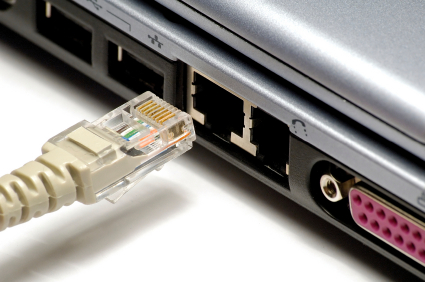
Is your Ethernet port not working? This could be happening for a number of reasons. First, make sure that the Ethernet cable that you are using is good by testing it with another computer. Also, make sure that the two ends of the Ethernet cables are connected to a functioning switch or a router from your computer.

If this doesn’t fix your problem, this article will guide you through the possible causes for your Ethernet port not working and possible fixes.

A Power Outage May Be Responsible

A sudden power outage while the computer is in operation may damage the hardware of the computer. The fluctuation in the power level may “fry” the circuitry and the processing components, severing the connection between the processor and its Ethernet port.

The damages caused by power overload can be unpredictable, and a consultation from a professional is recommended before attempting any fixes of your own. The damaged hardware will need to be examined by an expert and then replaced. Refer to the end of this guide regarding help from the experts.

Wrong Settings in the Computer

Configurations in your computer may either disable the Ethernet port or not recognize its existence. To check whether this is the problem, follow these steps:

1. Go to Control Panel.

2. Click Device Manager.

3. Check if the Ethernet adapter shows up in the device manager.

4. If it does, an error display should come up stating why it is not working correctly. Search the internet for how to fix this problem.

If an error display does not show up, check to see that your Ethernet port is not disabled in the bios. It possible that you have a defective Ethernet controller. This is a hardware problem – refer to the end of this guide for additional help regarding the fix.

Bad Hardware

If above recommendations do not resolve the issue, it is likely that the hardware is damaged. It is recommended that you call for help from an experts. TalkLocal can help with finding the a local expert to fix your computer quickly, which saves you time and energy in a stressful situation.

TV on but No Sound

Friday, July 20th, 2012

TV on but No Sound TV Repair

Watching your favorite show without sound is like corn flakes without milk; it’s just not the same. When you turn your TV on but no sound comes out, you want to verify a few things, like loose cables and volume settings, before banging the side of your TV.  Here is are some things to try when the TV on but no sound is coming out.

It is possible that your TV could be on mute. Turn off mute by clicking the mute button on your remote. Your volume might also be turned all the way down. Tinker with the volume and turn it up to see if this solves your problem. Also, check that the audio is NOT set to SAP, which stands for Separate Audio Programming. Locate the MTS button on your remote and press it until you see “MAIN” on your screen or until you hear sound.

The wires behind your TV might not be plugged in properly or could be damaged. Check all cables to verify that they are firmly plugged into the correct ports. For instance, if the video cables are connected to the Video 1 port, then the audio cables must also be connected to the Video 1 port. If you can, try using different audio cables. If the sound works with the new cables, then it means the old ones were damaged. If the new ones do not work, then there is a problem with the audio port. Make the colored cables are in the corresponding colored outlets.

You may also try unplugging and re-plugging your TV from its power source. Unplug all the cables behind the TV, but be sure to keep track which cable is plugged in where. Sometimes a reboot is all your TV needs to function properly.

If you are having further troubles with TV sound, consider using TalkLocal, a FREE service that connects you with the best professionals in just a few minutes. All you need to do is enter in your specific issue, location and availability, and TalkLocal will contact multiple TV repairmen who will then call YOU directly, ready to help.

Computer Won’t Come Out of Sleep Mode

Friday, July 20th, 2012

Computer Won't Come Out of Sleep Mode Computer Repair

After an extended period of inactivity computers have a tendency to go into sleep mode.  This would not be a problem if not for the fact that sometimes they don’t come back out of it. This can be frustrating and worrisome to the user because they have no idea what’s going on. Try the following steps to see why your computer won’t come out of sleep mode.

Why is this happening?

When a computer fails to return to activity, it could be a result of a bad memory module.  The only solution to this would be replacement for the malfunctioning part.  Another possibility is that the power source has failed in which case the same solution applies- replacement.

This problem seems to be quite common with the Windows operating systems especially Windows 7 and Vista.  The updates for such programs may be flawed and so you should be cautious when renewing them. If this is a reoccurring problem that cannot be fixed you should call the manufacturing company in order to get a replacement or to get more in depth assistance.

How can the problem be fixed?

First you should try to move the mouse, hit a few keys and wait a little while.  Your computer may have slower reactions than you expect.  If nothing continues to happen then the next step would be to hold the power button down and turn the computer completely off.  This will allow your computer to reboot properly.  When restarting your computer you should repeatedly hit the f8 button in order to enact safe mode.  This will help to prevent additional problems. If your computer has the setting make sure the wake button is pressed so that you aren’t unnecessarily turning your computer on and off.

Can I prevent future problems?

In order to prevent this from happening again you should go into power management settings from your control panel and turn off this feature altogether. Furthermore, you use hibernation over standby if you need something because this way all your stored data is written onto the RAM in non volatile storage.

What if it continues to happen?

This kind of problem may be more serious if it continues to occur.  In such a case you may be in need of professional help.  Try TalkLocal to find someone to help you solve your computer problems. TalkLocal can connect you with the most qualified local technicians and IT people immediately, saving you both time and money.

How Do I Apply for Custody of my Children

Friday, July 20th, 2012

How Do I Apply for Custody of my Children Lawyers - Family

Do you have kids and in the process of getting a divorce?  If so, you might be wondering, “how do I apply for custody of my children?”  In order to start a custody case, the first thing you’ll need to do is file a custody complaint and application with the appropriate court.  This usually will be the child’s home state as pursuant to the Uniform Child Custody Jurisdiction and Enforcement Act, but the precise timing and requirements for child custody will differ depending on your local and state laws. Be sure to research the requirements thoroughly before applying for custody.

The next step is to prepare a petition for custody that specifies the type of custody you want. There are two different types of custody: joint/shared custody in which both parents make major decisions and sole custody in which only one parent has the decision making. Lastly, you can also apply for visitation, which means that the non-custodial parents still has the right to see the child for a certain amount of time. At some point, you’ll also be asked to fill out a financial affidavit that details your income and monthly expenses so that the court may assign child support payments if necessary.

The courts will then assign a hearing date during which you and the other parent will have an opportunity to bring forward evidence showing that you have the best interests for the child. At that point, the court may choose to reassign custody or change visitation rights. The most important thing to remember is that the courts will always make a decision based on what the judge believes to be in the best interest for the child, weighing factors such as special needs, education performance, and the child’s physical and emotional state.

While it’s possible to apply for custody of your child(ren) without a lawyer, child custody proceedings may get quite complicated so it’s highly recommended that you speak with a lawyer about how to proceed legally.  TalkLocal can help you find a high-quality lawyer to improve your chances of gaining custody of your child as soon as possible!