Archive for the ‘services’ Category


How Much Do Moving Companies Charge?

Wednesday, November 21st, 2012

How Much do Moving Companies Charge? Moving and Storage

Figuring out how much money a move is going to cost you is a crucial step in the moving process.  It can be very confusing to make an estimate on how much a move will cost because of all the different factors that moving companies use to determine how much they charge. How much do moving companies charge? You can use this guide to give you an idea of these factors and how moving companies use them in different moving situations to come up with their prices.

There are two main categories of moves: local moves and long distance moves, which are each priced in different ways.  Local moves are traditionally charged by the hour.  This means paying an hourly wage for the workers as well as the truck they are driving.  Depending on your specific location, the average hourly rate for two workers and a truck should be between $90 and $120.  Remember that this hourly rate does not include packing materials or any extra fees that your specific company might charge.  Long distance moves are priced very differently, generally by weight, cubic foot, or a combination of both.  Determining a price estimate for a long distance move is much trickier and will depend on your specific needs, but a rough estimate based on a 200-mile move costs about $0.50 per lb.  If you want to get a more precise estimate on your move you can use this calculator; just plug in all of your details and location and it will work out an estimate based on your information.

Once you have an idea of what you should expect to be paying for your move, you need to find moving companies and get some quotes on the job from them.  There is no easier way to do this than with TalkLocal, which you can use to get in contact with a reliable local moving service within minutes.  Just enter a description of your needs, availability, and location and TalkLocal will connect you directly to someone who can help.

Outlook 2007 Cannot Send Email with Attachment

Tuesday, November 20th, 2012

Microsoft Outlook 2007 users: Are you experiencing frequent problems with email? If so, you’re fortunately not alone. Many users have reported problems with various aspects of Outlook 2007—one in particular being sending email attachments. While there is not one proven solution to the problem, many people have tried the following to successfully send email attachments without trouble:

– Try using a smaller image—while Outlook does not restrict the size of emails or email attachments, most Internet Service Providers (ISPs) do. If the total size of the email—including all attachments and actual message content—is over the limit of your particular ISP, this could be your problem. Try reducing the size of your file or image, and then re-attaching.

– If you receive the “Microsoft Office Outlook is synchronizing folder” message, try clicking on Tools > Folder options > Offline folders. Once you are here, you have the option to “disable offline folders.” After you’ve disabled offline folders, reboot and try again. This could solve your “synchronizing” problem.

– Back-up and uninstall—if neither of these suggestions solve your problem, try simply backing up your files, uninstalling Microsoft Office 2007, and reinstalling.

Many users experience a variety of other problems in addition to sending email attachments. If this is the case for you, there are some suggestions that are useful for solving general problems as well. For example, try reducing the size of your users’ mailboxes. While this can be inconvenient for all, it may help solve your problem. You may also want to try using Outlook in Regular Online Mode as opposed to Cached Mode. To do so, go to Tools > Account settings > Exchange. Then click Change > More Settings. In the “Advanced” tab, click on Offline Folder Settings > Compact Now.

While these solutions may not solve every issue you’re experiencing with Outlook, they can help to increase performance and make the process somewhat less aggravating. If you feel you’ve exhausted all at-home repair options, you can contact customer service or have a trained professional investigate the problems. For a no-hassle matchup with a local business eager to help, fill out a service request on TalkLocal’s website and talk to someone within minutes.

Car Will Not Start Clicking Noise

Tuesday, November 20th, 2012

Car Will Not Start Clicking Noise Auto Repair

When your car does not start, it can be one of the most aggravating problems.  There are many reasons that can prevent a car from starting.  If you start hearing a clicking noise, there could be major issues.  The usual problem is with the car battery. There are some simple tests and solutions a person can try before the contacting a car mechanic.

Battery Check

When a car makes a clicking noise but does not start, it is usually the sign of a dead battery. To check if the battery is completely dead, check the headlights and to see if they turn on. If the battery is immobile, then you can jump-start the car. To jump-start a car:

1.      Make sure both cars are turned off.

2.      Connect one end of the red jumper cable to the positive terminal of the stalled (bad) battery.

3.      Then connect the other red cable clamp to the positive terminal of the charged (good) battery.

4.      Connect one end of the black jumper cable to the negative terminal of the stalled  battery.

5.      Then connect the other black cable to a clean, unpainted metal surface under the stalled car’s hood. IMPORTANT: Do not connect the negative cable to the negative terminal of the stalled battery.

6.      Start the mobile car and run it for about two to three minutes before starting the immobile car.

7.      Remove cables in reverse order.

8.      Keep the previously immobile car running for at least 30 minutes to let the battery recharge.

Battery Connectors

If the car is silent when turning the key in the ignition, this may be from dirty or corroded connections on the battery’s terminals. Check under the hood. If the connection is corroded badly, push in the tip of a screwdriver between the connector and the terminal post and twist it to make it stay firmly in place. This is only a temporary solution; these connectors need to be cleaned or replaced eventually.

There are many causes for a car to not start, but some are as simple to fix as the car battery. More challenging problem will require a car mechanic. TalkLocal can connect you with one of the best car mechanics in your area for free.

Keep, Toss or Store: 8 Secrets to Making Downsizing a Breeze

Tuesday, November 20th, 2012

Keep, Toss or Store: 8 Secrets to Making Downsizing a Breeze - - Seva Call Blog

Downsizing can mean less housework, minimal home maintenance and lower electric bills. Moving can mean stress, change and excitement. Here are 8 secrets in combining the two and making downsizing a breeze.

Decide What Stays and What Goes

Even if you only have a month to pack, decide what stays and what goes before you move into your new place. Too often people pack everything up with the intention of sorting possessions when they unpack. You are more likely to find a place for something you don’t need when you are unpacking. Don’t do it. Throw away, donate or recycle items now. Grab a bag and get rid of everything that no longer has a function or value.

Stow or Throw

If you decide there are some things you just can’t part with — like Mother’s Day cards from your son or camping gear you use once a year — use self storage units to stow these items until you find a place for them. If you are afraid your new place is too small for anything but everyday items, invest in dual-function furniture to serve as somewhere to sit and somewhere to stow.

Weed Out Your Wardrobe

Sort through your closet and if you find articles of clothing that haven’t been worn in the last year it is time to say goodbye. Donate old or never worn clothes to someone who will get more out of them then you.

Have a Yard Sale

Sell bulky furniture or appliances you won’t need to earn a little cash and downsize what you won’t have room for. Items you don’t sell can be donated, recycled or even given to friends or neighbors as a parting gift.

Cull the Library

It’s possible you’ve spent years adding to your library and feel proud of what you accomplished. Unless you plan to have shelves instead of walls, cull your library. Find the books you won’t read again or haven’t read in a while and donate them to a school, public library, charity or thrift shop. If some novels or story books seem too sentimental to part with, give them to your friends or children.

Clean Out the Kitchen

Most people don’t need 10 mixing bowls and won’t lose sleep over parting with an extra spatula or two. Analyze your kitchen and decide what you do and don’t need. Determine if you will be hosting many parties in your new, smaller place. If not, consider passing your china or fine silverware onto family or friends who could use it more.

Let Things Go

If you are on the fence about an item, let it go. Chances are you won’t even realize it is missing, let alone miss it when you move into your new home. Even if a craft project or 15-year-old ottoman doesn’t have an expiration tag on it, these items do have expiration dates. Weed out projects that you never got to — and still won’t get to, don’t fool yourself.

Get Excited

Not only are you moving, but you are downsizing. It can be stressful; we get that. But take time to relive the memories, photograph the stories and comfortably close that chapter in your life — smiling. You have a new, smaller space waiting for you. Get excited about decorating it.

Lastly, remember, you don’t have to do everything by yourself! When you need help, call moving and storage professionals at TalkLocal!

Filing Tax Return Late Penalties

Tuesday, November 20th, 2012

Everyone hates thinking about April 15th–but not as much as they hate forgetting about it. If you missed the deadline for filing a tax return and are getting a refund, there is no penalty, given you file within three years. If you file after that, you will not receive your tax refund.

If you do owe additional taxes, you need to e-file as soon as possible. The penalty for late filing (5% of your owed taxes for every month it is late) is worse than the penalty for late payment (.5% of your owed taxes for every month it is late). The maximum charges accumulated for both penalties is capped at 25%. So suppose you file a late tax return in April and make your payment of $1,000. The late filing charge would be $50 whereas the late payment charge would only be $5.

There are certain situations that are exempt from penalties and given a two month extension. This includes:

1. Being out of the country (the U.S. or Puerto Rico) for your main place of work or military or naval service. You can receive and additional four months by filing an extension and paying taxes you owe.

2. Not receiving your Form W-2.

3. Receiving a Form W-2 you believe is incorrect.

4. Being self-employed.

Not Filing a Tax Return At All

If you fail to file a tax return, the IRS will send you a reminder to do so. If three years have past since the deadline, you forfeit your tax refund. The IRS will eventually help you file a substitute return based on other sources; it will not include exemptions or expenses you may be entitled to. Continued non-compliance can lead to other penalties and even criminal prosecution.

TalkLocal can connect you with local tax preparation services to help you file your taxes as soon as possible. With TalkLocal, you don’t have to flip through the yellow pages and call unresponsive businesses. TalkLocal matches you with up to three companies in minutes because time is money–especially during tax season.

How to Get Rid of Wasps

Tuesday, November 20th, 2012

How to get rid of wasps Pest Control

If you’ve ever been stung by a wasp, you know that having a wasp’s nest in your yard is a big problem. Wasp removal can be tricky, but knowing the correct strategy for the right type of wasp will help you successfully remove these pests. Learn how to get rid of wasps with the tips we’ve provided for you below.

It is important to distinguish the two types of wasps: solitary and social. The solitary wasp is usually very docile with a very long, thin body and waist. These wasps are not territorial and rarely sting. They are actually considered beneficial in the gardening sense because they prey on garden pests such as aphids and beetles. To remove solitary wasps, simply fill a spray bottle with citrus oil extract. A quick spray will kill these pesky solitary wasps on contact.

Social Wasps

The United States has three common types of social wasps: paper wasps, bald-faced hornets and yellow jackets. Social wasps have nests and are usually the kind of wasp that people want controlled.

– Paper Wasps: These are the most docile of the social wasps and are usually only considered pests in high traffic areas. They build intricate nests, much like the honeycomb, without an outer shell like most bee and wasp nests. To remove paper wasps, purchase a can of pressurized wasp killer and spray the nest in a sweeping motion during the night.

– Bald-Faced Hornets: Hornets are fearsome looking, but are usually not looking for trouble. They live in aerial nests and tend to be less aggressive than yellow jackets. To get rid of hornets, you should also use a can of pressurized wasp killer to spray the nest from a distance during the evening. Bring a flashlight, too, if you’re not certain where the entrance to the nest is.

– Yellow Jackets: Yellow Jacket wasps are extremely territorial and aggressive. Their thick waists and bright yellow patterns easily identify them. The best way to get rid of yellow jackets is to identify the nest and then pump enough poison into the nest to kill all of the wasps in one shot. Obviously, this is easier said than done. To find the nest, you should wait until dusk when all the yellow jackets will be returning to the nest. You can pick out the high amount of flying insect traffic in the evening sun. Once the nest is identified, use a can of non-projectile wasp killer to spray the nest later at night. Spraying the nest at night means there is less of a chance that the wasps will come out to fight.

Before spraying any nests it is a good idea to wear gloves and multiple layers of clothing to avoid stings. Move slowly around the nest because sudden movements can attract attention.

Nest Removal

Once you are sure all the wasps have been killed, you can safely remove the nest. For underground nests, it is probably safe to fill the nest with dirt and gravel. You can knock down the nest if it is aerial. This should end your wasp problem until the next migration cycle.

If you’re consistently experiencing problems with wasps, you should consider hiring a trained professional to eliminate the problem. TalkLocal can connect you to several highly rated pest control professionals in your area within minutes. Simply give us a brief description of your service needs along with your contact information and times available, and TalkLocal will do the rest.

How to Floss

Tuesday, November 20th, 2012

How To Floss Dentist

Did your recent trip to the dentist not go as well as expected? We’ve all gotten lectured about flossing since before we can remember, but if you’ve finally decided to listen to your dentist, make sure you’re doing it right. Proper flossing will remove plaque and food particles in areas that your toothbrush cannot reach. Learning how to floss will help prevent tooth decay and gum disease, which is why flossing is so strongly recommended by your dentist

How to floss:

1. Start with a long strand of floss, around 18 in. long.

2. Wind most of the floss around your middle finger, so you’ll have an inch or two to work with.

3. Slide it between each tooth. You’re motion should go up and down, ensuring you cover the entire area.

4. Curve the floss around the base of each tooth.  Go all the way down to your gumline, but don’t force the floss.

5. Every time you move to a different tooth, make sure to use clean sections of floss. Otherwise you’re just spreading plaque and food from tooth to tooth.

If  you’re noticing problems with your teeth that flossing is not helping, you should schedule an appointment with you dentist. If you need a new dentist, try using TalkLocal to find one. Our free online service will provide numerous local options for you within minutes.

What Does a Roof Replacement Cost

Monday, November 19th, 2012

What Does a Roof Replacement Cost Roofers

What does a roof replacement cost? Replacing a roof yourself generally costs less because you don’t need to pay yourself for the labor for the project. However, you should remember the risks involved in doing jobs like this yourself. If you are inexperienced or working with a difficult roof, you may accidentally injure yourself. If you are preparing for inclement weather or need the roof replaced quickly, it is best to hire a professional team to assist you.

As far as materials go, here are the corresponding prices–assuming that the roof replacement is done for an average-sized house.

Roofing Prices by Type

Asphalt: $700 – $3,700 per roof

Slate: $17,000 – $84,000 dollars per roof

Wood Shingles or Shakes: $7,000 – $20,000 per roof

Concrete Tile: $8,000 – $21,000 per roof

Ceramic Clay Tile: $12,000 – $21,000 per roof

Steel: &5,000 – $22,000 per roof

Aluminum: $12,000 – $24,000 per roof

Copper: $25,000 to $40,000 per roof

You will also need to purchase the correct tools for the job. Purchase at your own discretion. Some of the materials are not necessary, but will make the job a lot easier. For example, the chalk line will be easier than trying to hold the tape measure in place to create a straight edge.

Suggested tools

Hammer

Crowbar

Ladder

Tape Measure

Chalk line

Caulking gun

Roofing Nail Gun

Shovel

Box cutters

Hammer Stamp

Other Factors in Pricing and Hiring a Professional

Provided that you hire a professional to do your job for you, there are various factors that can affect the pricing. One of them is the accessibility of the roof. If your roof is higher up from the ground and requires more effort to reach, the workers will charge you more.

Another aspect of accessibility is the slope (angle) of the roof. Steep roofs require more labor, driving up the price. Additional costs may be added to the job depending on where you live. Hurricane-prone areas have special requirements for the roofs, further increasing labor.

TalkLocal can help with finding the best local roofers to fix your roof quickly, saving you time and energy in a stressful situation.

How to Replace a Toilet Seal

Monday, November 19th, 2012

How to Replace a Toilet Seal Plumbers

How to Replace a Toilet Seal

Potty, john, loo, lavatory, the toilet. It goes by many names but it’s here for the same thing. A toilet is an integral part of our everyday lives. Furthermore, the toilet seal on your commode is very important because it prevents damage to your floor. Read more to learn how to replace a toilet seal.

The seal is located at the bottom of the toilet. It rests on the floor and is a gasket made out of a ring of wax. If you want to replace it you should be able to get another one from any hardware store. It is an inexpensive part, yet it prevents major damages to the floor and sub floor. Replacing your flooring is a lot more expensive than just the seal.

Before doing anything with the toilet or the seal, you should shut off the water supply in your home.  Flush a few times to empty out both the tank and the bowl.  You should also use a sponge to soak up and remove any water left behind.  When replacing the toilet seal, you need to wear gloves and make sure that the temperature is set at at least 70 degrees Fahrenheit so the wax that makes up the seal is very pliable.

The first thing you should do when replacing the toilet seal is remove the caps and nuts that hold the base of the toilet bowl to the floor. You should now disconnect the water supply line. Gently move the toilet bowl around to break the current seal completely. Remove all the old wax remnants.

Now unwrap the new seal and place it all around the toilet opening round side up. Make sure that all the bolts are in place. Lift the toilet and place it over the flange/seal. Now you can do the actual sealing. Make sure the toilet bowl is level before replacing the nuts and caps and tightening them. Then, reconnect the water line and turn the water supply on. Flush and make sure that the water levels are correct. Make sure to wash your hands with anti-bacterial soap.

Continuing Problems

If you continue to have problems with your toilet bowl seal you should seek professional help. Use TalkLocal to be put in contact with reliable local plumbing businesses within minutes.  You don’t have to do any work! Simply input your problem and availability and TalkLocal will do the rest.  Almost immediately you will be connected on the phone with someone who can help you out.


How to Restart Windows 8

Monday, November 19th, 2012

How to Restart Windows 8 Computer Repair

Windows 8 is the newest operating system from Microsoft and is designed primarily for use with tablet computers. Unfortunately, even experienced users of previous Windows versions will feel as though they’ve been violently and unexpectedly thrust into alien terrain.

Many users have reported finding this operating system’s Shut Down, Restart, Sleep and Log Off features to be an exercise in frustration. Unlike Windows XP, Vista and 7, which conveniently and sensibly placed these options in the Start Menu, Windows 8 seems determined to get you to jump through hoops just to do something as basic as rebooting your computer. Fortunately, this guide will teach you how to restart Windows 8 with relative ease.

If you’re looking for the shut down and restart options in your Metro Start Menu, you’ll be sorely disappointed. All that you’ll find there are the options for logging off of your Windows account or locking the machine to prevent unwanted access. There are two ways that you can go about restarting or shutting down your computer in Windows 8.

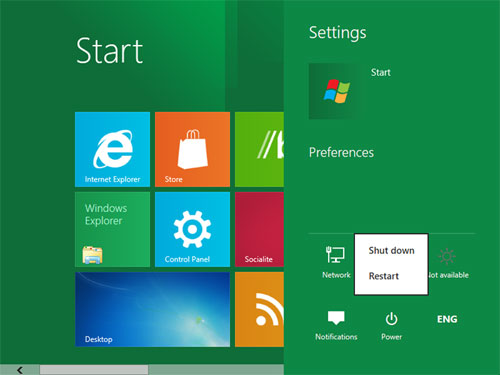
1. The first way is to open up your Charms box by pressing the Windows+C keyboard shortcut combo. This will bring up a dialog box that contains additional PC options. Once you’ve opened the box, click on the Power button to display a list of more options. Pick the action you wish to perform.

2. The second and simplest way is to use the classic keyboard shortcut combo, Alt+F4, from the desktop. This will bring up another dialog box, but it will look much more similar to a Windows XP-style box. It will contain a drop down menu with options for switching users, logging off, shutting down or rebooting. Before rebooting using this method, it’s strongly recommended that you save any open work and close all of your open or active applications.

If you’re still having trouble rebooting your computer, you may need to call in a professional who is familiar with this operating system. Fortunately, TalkLocal makes it easy to find one in your area.