
Caution with Facebook Apps

Monday, July 16th, 2012

Caution with Facebook Apps - Computer Repair

With the expansion of social networking sites like Facebook came a a large expansion of applications.  Whether you like games, quizzes, or photos, apps are an excellent way to stay entertained on Facebook.  Anyone can create an app and they spread quite quickly through series of friends–giving them potential for scam-related activities so you should show caution with Facebook apps.

In order for you to use an application, it must access certain information from your profile.  No one wants their private information floating around, so Facebook allows applications to access only what they need from you.  As with everything, though, there are ways around the rules, and this is where Facebook scams come in. Although Facebook is constantly updating its privacy policies to protect you against these types of activities, some hacking does get through.

Some Facebook scams are much more dangerous than others.  You may be familiar with the recent security leaks claimed by some users.  It is alleged that certain applications were leaking user information to advertising agencies, who then performed target advertising on the users’ pages.  This is fairly harmless, but nonetheless discomforting to most.  On a more serious scale, scams trick users into sharing private information to fraud artists or downloading viruses or malware. However, if you follow a few simple rules and stay smart on the Internet, you can keep your private information and computer safe.

  • NEVER accept something that asks for a password or your credit card information.  This is completely unnecessary to the application process and is likely a scam in disguise.
  • Avoid downloading extra software that is “required” to run an application.  This could be malware intended to corrupt files on your computer or access your personal information.

If you are afraid any of these scam-related activities have already occurred on your machine, it is always safest to have your computer analyzed by a professional.  TalkLocal can easily connect you to a computer repair service to help correct damage or prevent future mishaps.
How to Prepare your House for a Maid

Monday, July 16th, 2012

How to Prepare your House for a Maid Maid Services

Preparing your house for a maid can be a tricky task. One challenge is understanding what information to convey to the cleaning service. Also, understanding a maid’s role and his or her expectations is key. On one hand, you want to clean up a bit to look presentable but on the other hand, you do not want to do the work that you are paying for.  Here are some tips on how to prepare your house for a maid.

1. Communicate

– Leave instructions for garage doors, locks and keys, alarms, and pets.

– Be clear describing the length of stay and amount of payment.

– Convey special instructions for particular pieces of furniture.

– Provide feedback on the maid’s previous visit on areas that went well and areas that need improvement.

2. Clarify

– Read the contract and know if the maid will bring cleaning supplies.

– Provide directions to access cleaning supplies (e.g. vacuums, washing machine, etc.) you want used.

– Provide instructions for when you need certain areas cleaned by and what you expect the house to look like when you return home.

3. Understand

– A maid is there to clean, not to pick up and organize your belongings around the house.

– Maids have accidents, too – pick up items you do not want damaged in the cleaning process.

Other helpful tips:

– Don’t leave fragile objects in vulnerable locations around the house in case accidents happen.

– Tell your maid where to leave the clean dishes, unless you like searching through cupboards later.

– Take the kids to the park while the maid is there. You can get some fresh air and the maid can do his or her job without distractions.

Now that you have prepared your house for a maid, you are now ready to have your home cleaned. TalkLocal is a free service that will connect you directly to a maid service that can come when you need one. TalkLocal picks up to three high rated companies in your area for you to choose from.

Clay Tile Roof Installation Cost

Monday, July 16th, 2012

Clay Tile Roof Installation Cost Roofers

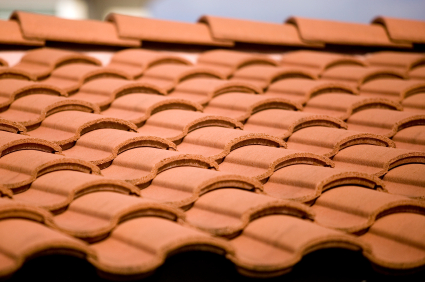
Installing a clay tile roof can bring old-fashioned charm and beauty to any style of home. Although a clay tile roof may be attractive, keep in mind they are usually a bit more expensive than traditional roofing materials. If you are considering installing a clay tile roof, there are various factors to consider in order to accurately estimate the cost.  Read more below to get an estimate of clay tile roof installation cost.

Cost of Building Materials

Clay tile roofing is typically more durable than traditional roofing options; clay tile roofing manufacturers offer warranties in excess of 50 years. However, this durability comes at a price – the materials often are over twice as expensive asnormal roofing materials. Depending on the type of clay tile roof you want, the difference could be over fifty dollars per square foot!

Cost of Installation

Another major factor to consider when estimating total costs are the higher labor rates for installing clay roofing. Clay’s weight and composition make it more difficult to work with than traditional roofing materials. Because of the skill required to work with clay tile roofing, the installation costs are often over twice as expensive than normal. The cost can increase even further if the pitch of your roof is steep enough to prevent walking on the roof. You will also have to account for the extra time it takes to install scaffolding and roof brackets as well. All of these factors will have to be accounted for in your final estimate.

Clay roof installations are difficult and not often attempted by the average homeowner. Make sure that your installation is taken care of by experienced consultants and contractors.

If you are still having trouble estimating your roof installation costs, or are ready to hire a reliable company to do your installation, use TalkLocal to get in contact with local roofers immediately.

Two-Tone Paint Colors for the Living Room

Monday, July 16th, 2012

Two-Tone Paint Colors for the Living Room Painters

Spruce up your living room with a fresh paint color—or two. Two-tone paint colors are a simple, yet attractive way to enhance the look of your living room. Choosing harmonious two-tone paint colors for the living room can be tough, so read below for foolproof color schemes. Then, brush up on some popular paint designs for two-tone living rooms.

Color choices

Analogous color schemes are comprised of colors that lie next to one another on the color wheel. For example, blue and green are analogous colors. More specifically, robin’s egg blue and teal are also analogous colors. An analogous color scheme is a subtle way to enhance the dimensions of a room. Usually, there is one dominant color and one supportive color in an analogous color scheme. For example, you can have terra cotta as a dominant color and cream as a supportive color.

Complementary color schemes are comprised of colors that are across from one another on the color wheel. For example, yellow and violet are complementary colors. Complementary colors should be balanced throughout the room because of their high contrast. Use complements to accent details in the room. You can also choose furnishings that match the complementary colors to fill out the room better.

Designs

Top-bottom

Some people use two-tone paint colors to make living rooms with high ceilings more proportional. The top half of the wall is painted one tone and the bottom half is painted with the other. The color change breaks up the tall appearance of the wall.

Wall-wall

Color changes can be used to bring focus to one part of the room. With this design, each wall is painted entirely with either of the two tones. The combination of designs is flexible; some people paint just one wall a different color to bring attention to the wall décor or brighten that side of the room. Others paint the ceiling a different color to make the room seem bigger.

Single stripe

Bring attention to the two-tone color choice by painting a thick stripe of the alternate color across the middle of the room. This is a bold and interesting way to showcase both tones. The stripe also makes the room more unified because it runs around the entire room.

Regardless of your color choice or design, utilizing two-tone paint colors is an easy way to add style to your living room. You can get started right away by hiring a local painter through TalkLocal. Just submit a service request on TalkLocal’s website to talk with a high quality painter in minutes!


Computer Not Working

Monday, July 16th, 2012

Computer Not Working Computer Repair

Have you ever had a problem with your computer not working? All you want to do is go on Facebook, check your email, and listen to some music on iTunes or Spotify. You go to turn on your computer and nothing happens. You can’t access any information, data, pictures, or other files you want from your Windows or Mac computer. What to do?

The first thing to check is your power source. If you’re using a laptop computer, make sure your computer is charged. If you’re using a desktop computer, make sure the cord is plugged in. Both of these may sound silly, but it’s always good to double-check. You may be having a problem with your outlet and not your computer, so try plugging into a different one.

If your computer won’t turn on at all, no lights, no fans, you might have to replace your computer’s power cable or power supply. The power cable is the cable that runs between the computer case and the power source.  If it is a laptop, try using a friend’s cable. If it is a desktop computer, switch the power cable from your monitor to the computer.  The power supply is inside the computer and usually shaped like a box. If it is not functioning properly, it needs to be replaced.

If that doesn’t work it may be time to call for some help. TalkLocal, a free online service, can connect you to high quality computer repair businesses in your area within minutes. Just fill out a short form stating your problem, location, and availability and you will be talking with a service provider who can fix your specific problem.

Computer Frozen and Won’t Turn Off

Friday, July 13th, 2012

Computer Frozen and Wont Respond Computer Repair

It is frustrating when you are in the middle of working on something and your computer stops responding—it freezes—and prevents you from shutting down. When your computer is frozen and does not turn off, you may be immediately inclined to hold down the power button, unplug your computer, or remove the battery (for laptops). Although this definitely shuts down your computer, you run the risk of data loss and corrupting files. Instead of taking the shortcut that can damage your computer, you should try to identify the problem area. Your computer may be frozen due to viruses, program incompatibility, overheating, or more. Keep reading to learn what to do when your computer frozen and won’t turn off.

Viruses may cause your computer to randomly freeze and stop you from being able to shut down your computer properly. If your computer only works smoothly in Safe Mode, then you might have a virus. Make sure you install an antivirus on your computer and scan your computer regularly.

Another cause could be new software or updates installed on your computer. New programs might be incompatible with your operating system. When this occurs, uninstall the program and try to find a different program that is compatible with your system.

When your computer is frozen, it could actually be on the verge of a meltdown due to overheating. A hot computer is usually a slow computer, so check the CPU fan every now and then to make sure it is dust-free and functioning.

Running multiple programs at once can use up all the memory and cause your computer to freeze. In this case, try pressing “control + alt + delete” to open up the Task Manager if you are using a PC. You might need to select “End Task” to close the programs that cause your computer to freeze.

Still unable to control your cold-hearted computer? Use TalkLocal to help connect you to the best professionals in your area. Fill out a short form on TalkLocal’s website stating your problem, location, and availability. In minutes, TalkLocal will match you with up to three service providers who can help you “unfreeze” your cold-hearted computer.

How to Paint a Textured Ceiling

Friday, July 13th, 2012

How to Paint a Textured Ceiling Painters

Textured ceilings can be tricky to paint evenly, but it is not as hard as you may think. Using the proper tools will make this task much more simple. The tips provided below go over how to paint a textured ceiling.

Tools

A roller with an extension handle is the best tool to paint a textured ceiling. A thick-nap roller will give you full coverage over the irregularities over the textured surface. You will also need a roller pan and paint.

Prep the room

Make sure you prep the room so that you do not damage any furniture or the floor. Remove all furniture and cover the floor with drop cloths or tarps. Blue painters tape will help you cover any trims, door handles, frames or light fixtures.

Prime and paint

Prime the ceiling before you begin painting to ensure that you use less paint and the paint will last longer. After you prime, paint a cut line with a paintbrush on the ceiling where the ceiling meets the wall. After you have done this, you can use your thick-nap roller to paint the rest of the ceiling. Apply the paint in a zig zag followed by straight line motion. Paint one layer at a time and wait for the layers to dry between applications or else texture will peel away.

You may also spray paint your textured ceiling. The advantage is that you can guarantee even coverage in all the nooks and crannies of your textured ceiling. However, with spray paint you risk getting more paint on furniture and floors, so take extra caution.

TalkLocal can help connect you with the best-rated painters in your area. Learn how to use TalkLocal today!

Demos, Demos, Demos! Seva Call Saves the Day via Startup Demo

Friday, July 13th, 2012

The Seva Call team made a memorable appearance at yesterday’s D.C. Tech Meetup “Demos, Demos, Demos” event at the Sixth & I Historic Synagogue. Seva Call was one of nine tech startups to make an appearance and give the audience of tech-lovers and investors a demo of their product. We had a great time watching other entrepreneurs showcase the products they have devoted so much time and effort to, but we had the most fun giving the audience a demo of our service.

The Seva Call team choreographed a skit that told the story of a consumer in need of a service and her quest to find professional help. Rather than just explaining the steps of placing a service request, we created a scenario where Seva Call could really save the day. Our account manager Sean narrated the woes of our intern Emma who played the role of the consumer with a clogged toilet that threatened to ruin her party—and her reputation. Our programmer Augie played our Seva Call Superhero and connected Emma to our intern Connie who played the role of  “Plumber Wendy.” The Seva Call team had the audience laughing from the moment Emma took her seat on the “potty-training” toilet onstage.

After Sean walked the audience and Emma through the process of placing a request for a plumber just hours before her going away party, our Seva Call Superhero led Plumber Wendy to Emma’s rescue. Our creative and theatrical take on a demo had the audience tweeting, literally.  Niklas Munck, founder at economITech, tweeted, “After watching @sevacall demo at ‪#dctech I realize no demo is complete without superhero in a cape!” Another startup, Exfed, tweeted, “@sevacall excellent job. Don’t think I’ve ever seen a toilet on stage at a synagogue, but you guys made it work.”  We also received a tweet from Peter Corbett, host and founder of DC Tech Meetup, who said, “This @sevacall pitch is hilarious. ‪#dctech.”

Seva Call’s performance was among many captivating demos. Taskstrike kicked off the meetup, followed by Study Hall, RUNIN Out, and yours truly. Markerly wrapped up the first set of demos, which lead into a short Q&A for the first five startups.  Brackets kept the energy flowing in the second set as the audience erupted in applause mid-demo, in awe of Brackets’ code editing magic. The DC Tech Meetup finished strong with demos from Hin.ge, Sedan Magic now called Curb, and SimpleTix, as well as another Q&A.

It’s safe to say our demo and the meetup as a whole were successful. Thanks again to our Seva Call Superhero! Effortlessly saving parties since 2011.


Tips to Keep House Cool without Air Conditioner

Friday, July 13th, 2012

Tips to Keep House Cool without Air Conditioner Heating and Cooling

Air conditioning can hike up your energy bill during hot summers. However, this doesn’t mean you have to turn off the A/C and be miserable in the heat. Read below to learn some tips to keep house cool without air conditioner by being more “green”.

Fans

Circulating air on a hot summer day helps you stay cool. Ceiling fans or portable fans are useful for cooling off. A breeze is always welcome when you are outside during the summer, so bring the breeze inside your home to cool you down. You can also try to put a bowl of ice in front of your fan so that it blows even cooler air in your direction.

Insulate

Keep hot air out and cool air in by properly insulating your attic. Also, use caulking and weatherstripping around windows and other entrances to prevent cool air inside your home from leaking out. Pulling your drapes closed also prevents heat from coming in by blocking direct sunlight from heating up your home. Keep the sun out!

Reduce Heat Generating Activity

On especially hot summer days, avoid activities and appliances that generating heat. This includes doing laundry, taking hot showers and cooking hot foods. All of these activities generate humidity that gets trapped in your house. Also, turn off heat-generating lights during the daytime.

Plant Trees

Trees are not only beautiful and useful for fresh air circulation, but they also provide cool shade. If you plant trees around your house, that area will be shady and cool; perfect for a barbeque or a get together without the sweltering summer heat.

If you are having issues with your air conditioning, call a heating and cooling service to help you. TalkLocal can connect you with the best professionals in your local area in a matter of minutes.

Overheating Computer

Friday, July 13th, 2012

Overheating Computer Computer Repair

Laptop Very Hot: What happens when a laptop overheats?

Overheating computers cause many problems, such as randomly shutting down your computer or losing valuable data. Know how to recognize the symptoms of overheating and learn how to prevent your laptop from getting very hot. Read the following steps to fix your overheating computer.

Causes of Overheating

Dust is not only the enemy of allergies, but also laptops. The accumulation of dust causes your laptop to get very hot because it builds up in the cooling fan panels and prevents the CPU fan, or cooling fan, from cooling the laptop. The heat sink can also become clogged with dust and overheat laptops.

Using your laptop on your lap, bed, pillow, clothes, carpet or other soft area contributes to overheating because it prevents proper ventilation. Soft surfaces, especially cloth, are more likely to hold dust and lint, which can clog the CPU fan.

When you run multiple programs at once on your laptop you can drive the CPU usage to its maximum capacity, thereby contributing to overheating.

Signs of Overheating

If your computer is overheating, your fan will make a lot of noise because it is struggling and overworked. Over time, the CPU fan accumulates dust and eventually gets clogged. This prevents the fan from effectively cooling down the laptop, which is why the bottom of the laptop gets hot.

When the bottom of the laptop is hot then your laptop is on its way to frying an egg—or your data.

How to Prevent Overheating and Cool Down Your Laptop

Stop dust accumulation before it builds up. Regularly clean the cooling fan by blasting away dust with a compressed air can. If you wait too long and allow the dust to build up, the compressed air will just blow the dust farther into your laptop, and will deteriorate the quality of the laptop much quicker.

Make sure to always use your laptop on a hard surface, such as a desk or a table. We suggest getting a cooling pad that blows cold air on the bottom of the hot laptop. You should also consider elevating the back of your laptop with a hard prop–not a pillow or blanket–so that air ventilation can pass through to enhance the cooling process.

If the overheating problem persists, you may need to take your laptop apart to clean the CPU fan and heat sink.. We recommend hiring a professional IT technician, which you can find easily through TalkLocal.